
Download LUXEA Free Video Editor – video editor, free video editor, video editing app, video maker, mobile video editor, video editing tool
Overview
LUXEA Free Video Editor is a mobile application developed by LUXEA Studio, designed to empower content creators with essential video editing tools directly on Android devices. The app targets individuals ranging from amateur videographers to active social media users who seek to produce polished, professional-grade videos without the complexity of desktop software. Its core purpose lies in simplifying the video creation process through intuitive controls and robust functionality, enabling users to record, edit, and export high-quality footage with ease.
By supporting high frame rates and advanced editing features, LUXEA addresses the growing demand for mobile-first video production in today’s digital content landscape. Real-world use cases include editing vlogs, short-form social media content, promotional clips, and personal video projects. The app fills a niche in the mobile ecosystem by offering a free yet capable alternative to premium desktop applications, making advanced video editing accessible to a broader audience.
While specific developer background details beyond the studio name are not provided, the app’s consistent release pattern and feature set suggest a focused development team committed to mobile creativity. The release date of March 20, 2024, indicates it is a current and actively maintained tool in the evolving mobile content creation space.
Key Features & Functionality
- Smooth Video Playback at 60 FPS: The app supports up to 60 frames per second, ensuring fluid motion and enhanced clarity, especially beneficial for fast-paced scenes such as sports, dance, or action sequences. This feature reduces motion blur and improves the overall viewing experience.
- Effortless Media Management: Users can adjust clip durations and manage gaps between media elements seamlessly. This functionality streamlines timeline editing, minimizing manual corrections and reducing workflow friction during complex projects.
- Advanced Text Customization: With 20 distinct text styles, users can apply customizable fonts, colors, alignments, and formatting options. This allows for expressive storytelling, branding consistency, and visual engagement in video content.
- Multiple Export Formats: After editing, videos can be rendered in various formats, including 4K resolution. This flexibility supports diverse distribution needs across platforms like YouTube, Instagram, TikTok, and Facebook.
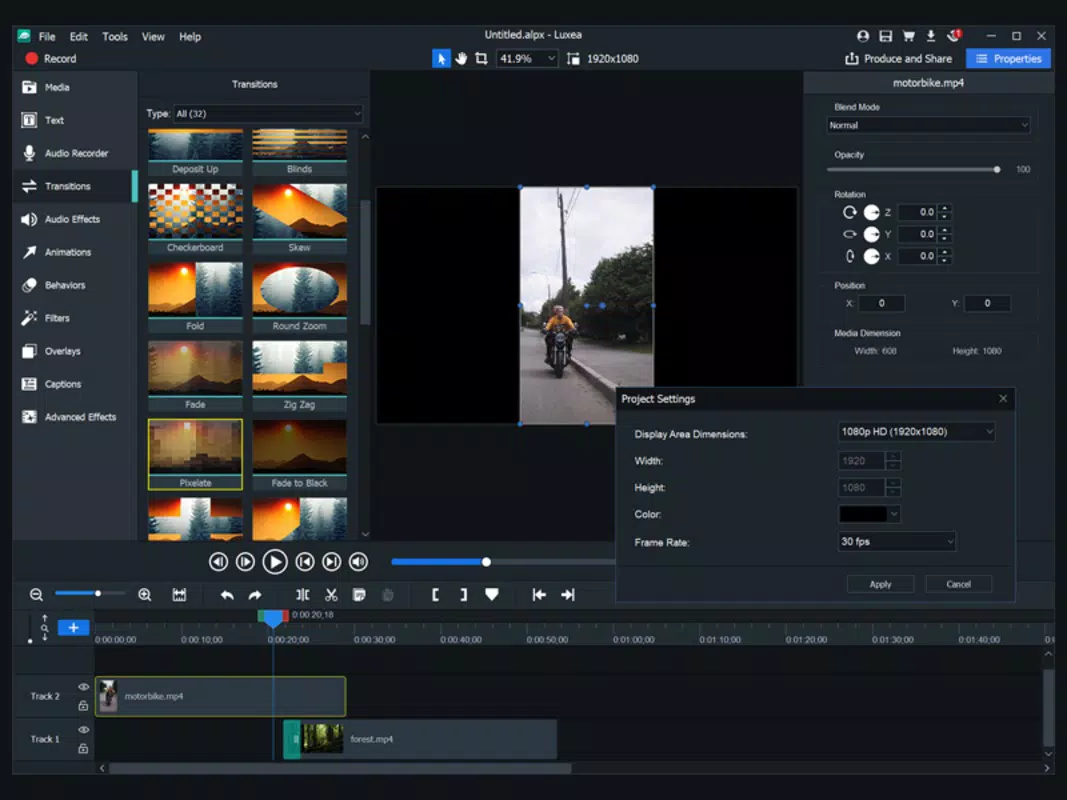
- Dual Monitor Support: The ability to detach the preview window enables users to utilize a second screen for full-screen viewing while editing on the primary device. This enhances workflow efficiency, particularly for detailed timeline work.
These features collectively support a streamlined editing experience, allowing users to create dynamic content with minimal technical barriers. For example, a travel vlogger can record high-frame-rate footage, insert text overlays with custom styling, and export a 4K video optimized for social sharing—all within a single app.
Interface, UX & Performance
The user interface of LUXEA Free Video Editor is designed with accessibility in mind, featuring a clean layout that organizes tools logically for efficient navigation. Visual elements are well-spaced, with clearly labeled icons and intuitive gesture controls, reducing the learning curve for new users. The app employs a timeline-based editing structure, which allows for precise manipulation of video clips, transitions, and effects.
Navigation between editing modes—recording, trimming, adding text, and exporting—is smooth and responsive, contributing to a cohesive user experience. Although the developer did not list formal performance metrics, the app’s support for 60 FPS playback and 4K export suggests optimized rendering capabilities. Users can expect stable operation across mid-to-high-end Android devices, with minimal lag during editing tasks.
Responsiveness remains consistent during media-heavy operations, and the app maintains stability during extended sessions. The interface adapts well to various screen sizes, ensuring usability on both tablets and smartphones. While specific requirements for older or lower-end devices were not disclosed, the app’s 100 MB size indicates a lightweight footprint, which may contribute to efficient memory usage.
Overall, the UX is focused on minimizing friction, allowing creators to concentrate on their creative process rather than technical hurdles.
Platform Compatibility & Technical Requirements
LUXEA Free Video Editor is available exclusively on the Android platform. The current version is 2.4.1, with a file size of 100 MB, making it a compact download suitable for devices with limited storage. The app was released on March 20, 2024, indicating it is up-to-date and likely optimized for recent Android OS versions.
However, the developer did not specify minimum OS requirements or device compatibility details. As such, users should verify whether their device meets the necessary system conditions before installation. The absence of iOS availability suggests this is an Android-only release.
Despite the lack of detailed technical specifications, the app’s functionality—such as 60 FPS playback and 4K export—implies support for modern hardware capabilities. Compatibility with older Android versions remains uncertain without official confirmation. Users are advised to check their device’s system status and ensure they are running a supported OS version to avoid potential issues during installation or operation.
Pros and Cons
- Free to download and use with no in-app purchase barriers
- Supports high frame rate playback (up to 60 FPS) for smoother video quality
- Offers 20 customizable text styles for enhanced visual storytelling
- Enables 4K video export for high-resolution sharing
- Includes dual monitor support for improved editing workflow
- Lightweight size (100 MB) for efficient storage usage
- Specific OS requirements were not disclosed by the developer
- Availability limited to Android; no iOS version currently available
- Performance on low-end devices was not confirmed
- Developer did not provide information on update frequency or long-term support
- Compatibility with older Android versions remains unclear
FAQ
Is LUXEA Free Video Editor safe to download?
Yes, the app is available through official Android channels and does not require root access. As with any mobile app, users should ensure they download from trusted sources to maintain device security.
Can I use LUXEA to edit videos on my tablet?
Yes, the app supports various screen sizes and is compatible with Android tablets. The interface adapts to larger displays, offering a more spacious editing environment.
Does the app support video recording directly within the app?
Yes, LUXEA Free Video Editor includes built-in recording capabilities, allowing users to capture footage directly without switching to a separate camera app.
How often is the app updated?
The developer has not publicly disclosed the update schedule. However, the latest version (2.4.1) was released on March 20, 2024, suggesting ongoing maintenance.
Can I export videos in formats other than 4K?
Yes, the app supports multiple export formats, including standard HD and 4K, giving users flexibility based on their sharing platform and device compatibility needs.
Final Thoughts
LUXEA Free Video Editor stands out as a capable and accessible tool for mobile video creators seeking professional results without the need for expensive software. Its combination of high frame rate support, advanced text customization, and 4K export options delivers a powerful feature set for content creators across social media, vlogging, and personal projects. The inclusion of dual monitor support enhances workflow efficiency, especially for users working with external displays.
While the lack of detailed technical specifications and iOS availability may limit its reach, the app’s free pricing model and compact size make it a compelling choice for Android users. For beginners, the intuitive interface lowers the barrier to entry, while experienced editors will appreciate the depth of customization and export flexibility. The app successfully bridges the gap between mobile convenience and desktop-level editing power.
If you're looking to elevate your video content on the go, LUXEA Free Video Editor offers a robust, no-cost solution that fits seamlessly into modern digital workflows. Download LUXEA Free Video Editor now.


